Manage Your Student Records
Your student record contains important information about your academic journey. Learn how to access your records, update your information, request services, and understand how your records are maintained.
Information Changes
Use the Personal Details tile in ctcLink to view and update personal information such as addresses, phone numbers, emergency contacts, gender identity, sexual orientation and more.
- Update Personal Details/Names (Fluid)
- Note: If the information is incorrect or needs to be updated, you must contact OtR
- Go to the ctcLink login page
- Enter your ctcLink ID and password, and click Sign In
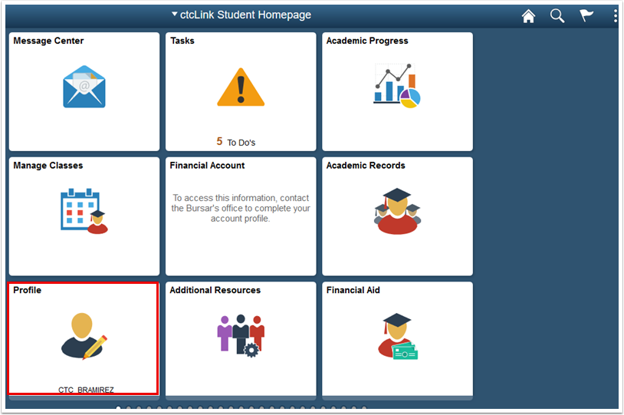
- Click Student Homepage, then Profile
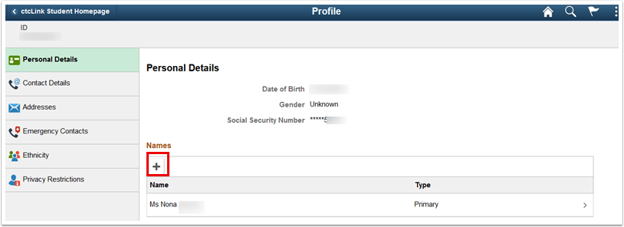
- Your Personal Details will be displayed, and you can review your personal details such as, name, date of birth and social security number.
- Listed below is your Primary Name. When you select Primary Name, you can view the legal name that is on file. You cannot update this online.
- You may add another name by clicking on the plus (+) button. Be sure to indicate which name is Primary and Preferred
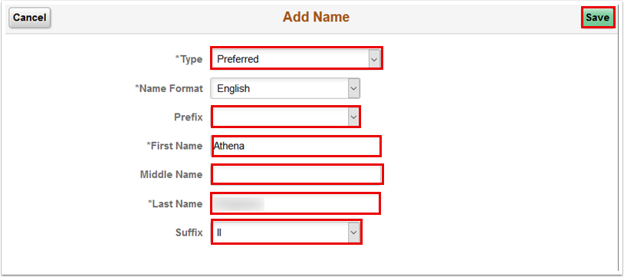
- Make the desired changes, and when finished, click on Save
If you need to change your Primary name of record, please complete our form.
Program Changes
Keeping your program up to date in ctcLink is one of the ways to make your time at GRC go as smoothly as possible. Upon admission into the college, you will self-select when program you plan on completing. If you are unsure about your program, you can submit a Program Change Request in the future once you decide or when you need to declare a new or different program.
By submitting this form, you are requesting to update your program at Green River College. This tool helps us make sure your student record is an accurate reflection of your program. Your program affects your eligibility for resources, funding, and advising. Please be sure you have considered any impact on your funding sources (Financial Aid, Veteran Services, WorkForce, etc.) or other programs in which you participate (e.g. TRiO) before submitting.
The Office of the Registrar highly recommends you meet with your Advisor before submitting this for if you have not already.
After you submit your Program Change Request Form, these changes are then reviewed by Office of the Registrar staff. Other Students Affairs offices may also review the information provided. Submitting this form does NOT change your program in ctcLink immediately. Please do not submit this form multiple times for the same program. Requests typically take 2-3 business days to process - subject to longer based on volume.
**Changes typically only occur between quarters. Therefore, if you submit this form in the middle of the quarter - you may not see the change reflected until the first day of the upcoming quarter. However, you can still use the "Academic Progress" tile on your ctcLink student homepage to access the "View What-If Report" for planning classes and reviewing program requirements. Once your request has been processed, a confirmation email will be sent to the your Preferred Email.
Preferred Names
At Green River College, we strive to understand the complexities of gender identities and support people on how they want to be addressed and supported. We are working toward changing our systems to eliminate "preferred" language and changing to "chosen" regarding names. While we cannot exclusively change the language used on state management systems (ctcLink, Canvas, etc.), we are working with the SBCTC to shift this language statewide as well. Please know this is a priority to us and we are working behind the scenes to ensure greater understanding and change.
Green River College allows students to identify the name they would like to be called in classroom settings and when interacting with college employees. This preferred name is used in a variety of applications.
Changing Your Chosen/Preferred Name
- Log into ctcLink and select the Profile tile.
- The Personal Details page displays and you will be on the Personal tab.
- Select + to add a preferred name.
- The Add Name page displays.
Enter Type = "Preferred".
Enter Prefix.
Enter First Name.
Enter Middle Name.
Enter Last Name.
Enter Suffix.
Select Save. - The updated Personal Details page displays.
Terms and Conditions
When you set your preferred name, you agree to all of the following:
- You have not set a preferred name with an intent to impersonate someone else, to deceive, or to defraud;
- Hate speech, inappropriate language, or repeated frequent use of this feature may bar you from using this feature, at the College's discretion;
- Your preferred name may be used in any Green River College system.
Questions?
Grade Forgiveness - accordion
Grade Forgiveness is designed to give returning students a fresh start from their unsuccessful transcript record after an extended absence from Green River.
The requirements for Grade Forgiveness are:
- The student has had at least a two-year absence from Green River and grades to be excluded must have been taken prior to the two-year absence.
- After returning to Green River, the student must demonstrate improvement by completing a minimum of 24 credits with a cumulative GPA of 2.0.
- The student cannot select specific courses or quarters for exclusion. Once the first quarter of Grade Forgiveness has been selected, all quarters between that quarter and the first returning successful quarter (after the two year absence from Green River) will be coded with the Grade Forgiveness comment on the transcript.
- Once Grade Forgiveness is processed, credits for excluded courses will be changed to zero (0) and will not be included in the Green River credit total or GPA. The student’s transcript will continue to show previous courses taken and grades received. A comment will be placed on the transcript indicating that Grade Forgiveness has been approved for the student.
- Credits excluded may not be reinstated, may not be used as prerequisites, and may not apply toward degree requirements.
- Grade Forgiveness may not be used to qualify for an honors designation.
- Students must see the Office of the Registrar for Grade Forgiveness. The Registrar will make appeal decisions.
- Only one Grade Forgiveness petition is permitted on the student’s transcript.